How to Prepare a Year-End Bookkeeping Handoff Packet
Organize invoices, payment evidence, receipts, and unresolved questions into a dated packet your bookkeeper can review without guessing.

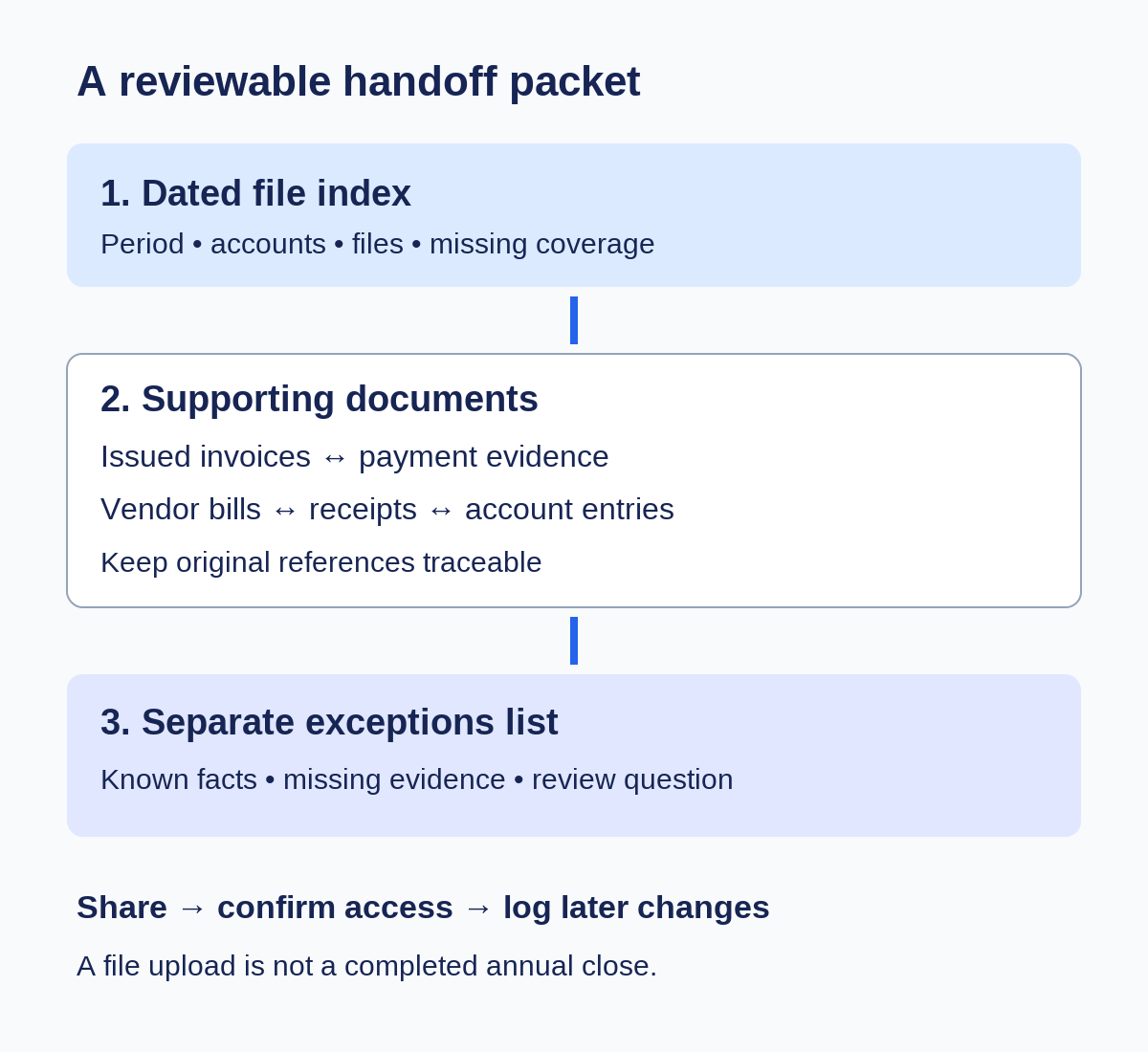
Your bookkeeper asks for your year-end records. Sending a folder of receipt photos is a start, but it leaves unanswered questions: which invoices were paid, which bank entries are transfers, and which documents are still missing? Prepare a dated bookkeeping handoff packet with a file index, supporting documents, and a separate list of exceptions.
This guide gives U.S. freelancers and small businesses a manual organization workflow for 2026 records. You can start it in November and add the remaining records after year-end. A November packet is an interim snapshot, not a completed annual close. Ask your bookkeeper which period, file formats, and accounts they need before uploading anything.
Define the period and create a file index
Write a short cover note with your business name, the period covered, the date prepared, and a contact for questions. List the business bank accounts, credit cards, and payment processors included, using nicknames or masked account endings. Identify any account that was opened, closed, or used only for part of the period.
Use a folder name such as “2026-books-interim-through-Nov-24.” Avoid calling a November export “2026-final.” If the packet ends before the final statement is available, name the missing period explicitly. Your bookkeeper needs to distinguish an account with no activity from an account whose records were never provided.
Create an index with one line per file or file group. Include its folder, covered dates, source account, and status: complete, partial, or missing. This is a navigation aid, not another ledger. Do not add its totals to your accounting balances.
- 01-Invoices: invoice register and original issued invoices, with payment references where available.
- 02-Payment-evidence: bank and processor statements covering the agreed period.
- 03-Expenses: vendor invoices, receipts, and notes explaining business purpose where needed.
- 04-Exceptions: unresolved questions, missing documents, and corrections awaiting review.
- 05-Handoff: the index, cover note, and a dated record of files supplied.
Keep original filenames or document numbers traceable. A practical filename is “2026-11-12_vendor_invoice-482.pdf.” Do not rename every source file into a generic sequence that removes the reference used in your records. Preserve originals when making annotated copies.
Connect invoices, receipts, and payment evidence
For sales, supply the invoice register alongside the underlying invoices. Identify canceled or superseded documents clearly. Preserve the correction trail instead of quietly replacing the old file. A resend of the same invoice should remain linked to the same charge; see how to resend an invoice copy.
For incoming payments, provide the bank or processor evidence and the invoice reference you used to match it. If one deposit covers several invoices, include the allocation rather than expecting the reviewer to infer it from the amount. Our guide to matching invoices to bank payments covers that reconciliation step in more detail.
For expenses, group receipts and vendor invoices so they can be found from the corresponding record. Keep both the purchase evidence and the payment evidence when available. A card statement can show money leaving an account without explaining every item bought or its business purpose. If a document is missing, identify the gap and your attempt to obtain a replacement rather than inventing a receipt.
The IRS explains that business books need supporting documents and that electronic records follow the same basic recordkeeping principles as paper records. See IRS: What kind of records should I keep?. This is the federal recordkeeping principle behind retaining source files; the folder layout here is an editorial suggestion, not an IRS-prescribed format.
Keep transfers between your own accounts identifiable on both sides. Flag a personal-card purchase used for business, an owner contribution, or an unfamiliar deposit for review. Do not classify every bank credit as customer revenue or every debit as a deductible expense merely to make the packet look finished.
Use an exceptions list instead of guessing
A useful exceptions list describes what you know, what is missing, and what decision is needed. Give each item an ID, transaction date, amount, source account, related document, question, owner, and status. Leave sensitive full account numbers out of the narrative.
Consider this fictional example, with amounts in U.S. dollars and no tax or fee adjustments:
- EX-01: invoice INV-410 totals $1,200. A confirmed $900 payment is linked to it, leaving $300 open. Ask whether the customer disputes the remainder; do not mark the whole invoice paid.
- EX-02: a $240 card charge has payment evidence but no itemized receipt. Request a replacement from the vendor and note the purchase purpose. Leave its tax treatment for review.
- EX-03: a $500 movement from business checking to business savings appears in both exports. Link both entries as the same internal transfer for the bookkeeper to verify.
The invoice arithmetic is $1,200 minus $900 equals $300. The $240 expense and $500 transfer do not belong in that customer balance. These three questions also should not be combined into a supposed “$1,040 deduction.” They concern different records and decisions.
Do not create a second invoice for the $300 solely because it is still outstanding. Keep the remaining balance attached to INV-410. Likewise, do not turn the missing-receipt entry into proof of deductibility. A well-prepared packet can contain unresolved items as long as they are visible and traceable.
Update exception statuses when evidence arrives, retaining the earlier question and the resolution date. If your bookkeeper makes an adjustment, ask how to reflect it in your working records so that the two versions stay aligned. Do not overwrite a previously delivered snapshot without saying what changed.
Share the packet and control later changes
Agree on the upload location with your bookkeeper using an established contact channel. Confirm the recipient and permissions before sharing. Use the secure transfer method they specify, and keep your own backup. Do not include account passwords, verification codes, or unrelated personal files in the packet.
Ask whether source PDFs, transaction exports, or both are needed. A screenshot may omit rows, dates, or transaction references that a reviewer needs. Keep exports in their original format and add explanatory notes separately. This workflow does not assume that any application can automatically import every bank or processor format.
Once the initial packet is delivered, record the version, period, files supplied, and unresolved item IDs. For a later document, send a small change note such as: “Version 2 adds the replacement vendor receipt for EX-02; the invoice register is unchanged.” This prevents an old and a new export from being treated as two distinct sets of transactions.
Here is a concise message you can adapt:
“Hi Jordan, I uploaded our 2026 interim records through November 24 to the agreed folder. The index lists the included accounts and covered dates. EX-01 needs a customer balance review, EX-02 is awaiting a replacement receipt, and EX-03 identifies an internal transfer. December records and the final annual statements are not included yet. Please confirm that you can access the files and let me know what else you need.”
Ask for confirmation of access and coverage. An upload confirmation only tells you that files were transferred; it does not mean the books are reconciled, the annual close is complete, or a tax return has been reviewed.
Finish with a reviewable checklist
Before handoff, open a sample from every document group. Check that receipt images are legible, PDFs have all pages, exports cover the intended dates, and filenames correspond to the index. Confirm that each listed account has records or an explicit explanation of what is missing.
Check the invoice register for duplicates and unexplained status changes. Keep paid, partly paid, and unpaid amounts distinguishable. For incomplete purchase evidence, use the lost receipt guide to identify what is available and what still needs review.
Use the Eonebill invoice generator to prepare individual invoices with clear descriptions and payment terms. Save the resulting invoice with the corresponding business records. This article describes a manual handoff process; it does not claim that Eonebill generates a year-end accountant package, reconciles bank accounts automatically, or determines tax deductions.
After the final period closes, add the remaining statements and documents, update the index, and revisit every unresolved item with your bookkeeper. Keep the interim and final versions distinguishable. Ask your tax professional about retention requirements for your circumstances instead of deleting source documents when the packet is delivered.
Educational information only, not individualized tax or legal advice. The IRS supporting-records source was checked November 25, 2026. The 2026 packet dates and dollar amounts are fictional workflow examples. No tax rates, filing deadlines, deduction thresholds, required retention periods, or state-specific rules are asserted.
Create this in 30 seconds — free invoice with Eonebill, no sign-up required.
Create Free Invoice →Frequently Asked Questions
More Posts

How to Send a Customer Statement for Multiple Unpaid Invoices
Summarize existing invoices without creating another charge. Separate overdue and not-yet-due balances with a checked $1,650 account example.

How to Resubmit an Invoice Rejected for a Missing PO Number
Resolve a missing purchase order reference, preserve the invoice history, and resubmit one traceable charge with a practical $1,250 example.

How to Invoice an Approved Change Order Without Billing Twice
Turn an approved scope addition into a traceable invoice. Reconcile prior billing with a $1,800 project and $360 change-order example.
Newsletter
Join the community
Subscribe to our newsletter for the latest news and updates