How to Resubmit an Invoice Rejected for a Missing PO Number
Resolve a missing purchase order reference, preserve the invoice history, and resubmit one traceable charge with a practical $1,250 example.

An accounts-payable email says your invoice was rejected because the purchase order number is missing. The work has been delivered, but sending another payment request immediately can leave the customer with two records and no clear explanation of which one to process.
This guide gives US freelancers and small businesses a practical way to diagnose the rejection, verify the buyer's reference, and submit a traceable correction. It is a document-control workflow, not a universal legal rule or a promise that adding a number guarantees payment. The fictional 2026 example uses US dollars and excludes tax and fees.
Find out what the rejection actually means
Save the rejection message, original invoice PDF, submission timestamp, and any portal tracking number. Ask accounts payable whether the document was rejected before entry, entered and placed on hold, or already approved for payment. Those states need different follow-up. A rejection email alone does not establish that the original invoice has been removed from their records.
Confirm the precise missing field. The buyer may need a PO number, a PO line reference, a goods-receipt record, or a different billing entity. Do not change the amount, customer identity, bank details, or dates merely to get past an upload screen. If the message arrives from an unfamiliar address, verify it through the client contact you already know before sharing documents.
Ask one concrete question: “Is INV-326 already recorded in your system, and should I attach the corrected PDF to that record or use a replacement submission process?” Keep the answer with the invoice. A portal status is evidence of processing, not evidence of payment.
The purchase order versus invoice guide explains the two document roles. Here the issue is narrower: an existing invoice needs a verified purchasing reference and a clear resubmission trail.
Verify the purchase order before adding its number
Request the actual PO or written confirmation from the buyer's authorized purchasing contact. Match the supplier, customer entity, project, currency, approved items, and available value. Check whether earlier invoices have already used part of the order. A number copied from a different project is not a solution.
Suppose INV-326 bills a completed research report for $1,250. The client provides PO-640 covering the same report at $1,250. You confirm with purchasing that the order belongs to your business and has no earlier billed amount. Adding its reference connects the existing charge to supporting approval; it does not create another $1,250 sale.
- Agreed report price: $1,250.
- Existing invoice INV-326: $1,250.
- New charge created by the PO-reference correction: $0.
- Total underlying charge after the correction: $1,250.
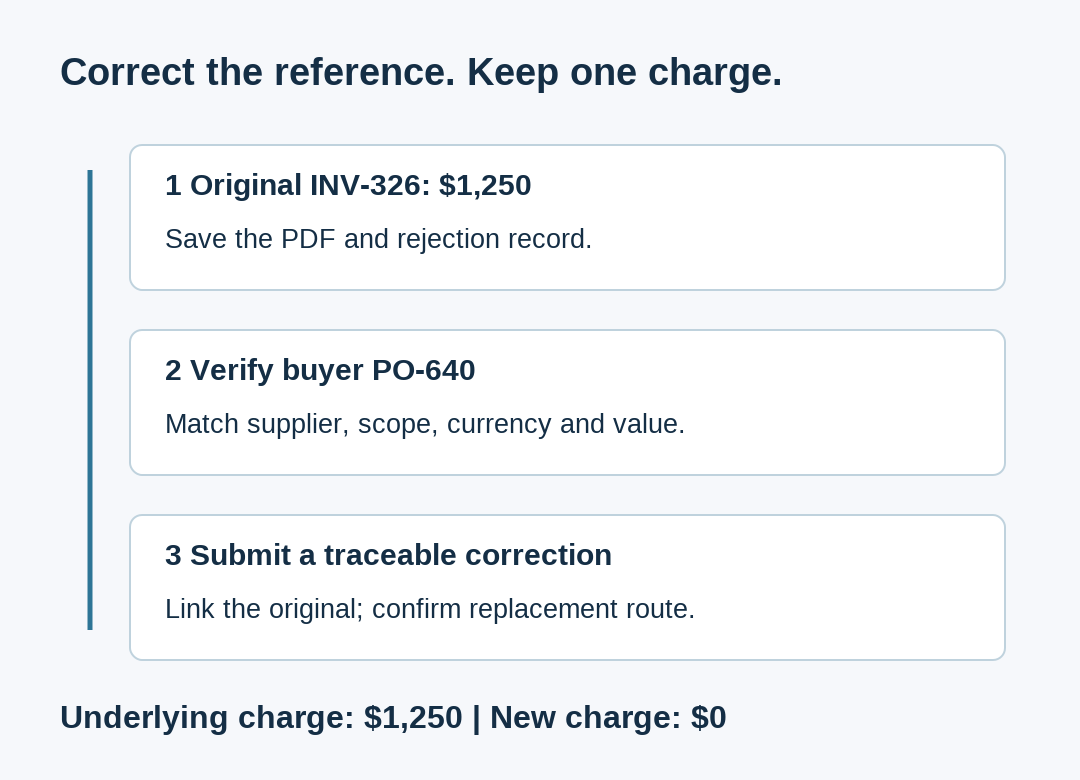
If the PO covers $1,000 while the invoice is $1,250, the difference is $250. Stop and resolve that mismatch with the buyer. Do not reduce the invoice silently, split it into arbitrary documents, or change the approved order yourself. An amendment, separate approval, or transaction correction may be needed, depending on the facts and agreement.
If no PO was ever issued, ask the buyer how it handles that exception. Do not invent a number, create a buyer document on their behalf, or assume a retrospective order is valid. Whether the customer owes payment depends on the agreement and applicable rules; their internal missing-PO status does not settle that legal question.
Prepare a correction with a visible document history
Preserve the original PDF and identify the approved change: “Added verified PO-640; amount and scope unchanged.” Record who confirmed the reference and when. Compare every field in the corrected document against the original so an administrative edit does not accidentally change a price or payment instruction.
Follow the correction process appropriate to your invoice register, accounting system, and jurisdiction. Where that process permits a reference-only revision under INV-326, distinguish the corrected attachment from the original in the filename and revision log. Do not assume every system permits editing an issued invoice. If your process requires a replacement document, link the old and new references and address the original record explicitly with your bookkeeper and the buyer.
Never issue a second active $1,250 invoice merely because the portal blocks a duplicate invoice number. Ask accounts payable for its documented replacement route. If a new reference is required by your correction process, confirm how the old record is cancelled, superseded, or otherwise prevented from being paid as well. Preserve the audit trail rather than deleting the original to make the numbers look tidy.
Check the original issue date, due date, agreed terms, and service period. The date you upload a corrected attachment belongs in the submission log. Whether the payment timetable changes depends on the agreement and any valid change to terms; adding a PO number does not by itself establish a universal new due date. Ask the buyer to confirm its proposed processing date separately.
You can prepare invoice documents using the Eonebill invoice generator. Compare its exported document with your approved records before sending. This workflow assumes you maintain the correction history and portal records yourself; it does not claim that the tool retrieves buyer POs or synchronizes their accounts-payable status.
Resubmit through the agreed channel
Use the channel the buyer confirms for the existing record: a replacement attachment, a correction workflow, or another documented submission route. Avoid uploading the same document through several channels at once without telling accounts payable. Save the submitted file, recipient or portal, date, tracking reference, and acknowledgement.
For the example, a concise message is: “Attached is the corrected PDF for INV-326, $1,250, now referencing verified PO-640. Only the PO reference was added; no new charge is created. Please process it through the replacement route confirmed for the original submission and confirm whether any further matching evidence is needed.”
If the client only lost the original PDF and no details need changing, use the unchanged invoice copy workflow instead. A correction log and a copy log describe different events. Neither event proves that the client has approved the charge or paid it.
After resubmission, check the processing status with accounts payable. “Uploaded,” “received,” “approved,” and “paid” are separate milestones. If goods or services also need an internal receipt, ask who must record it and provide truthful delivery evidence. Do not fabricate an acceptance or delivery date to complete the match.
Reconcile the record before following up
Keep a short register entry for INV-326: original submission, rejection reason, verified PO-640, approved correction, replacement submission reference, and current status. Confirm there is one underlying $1,250 charge. If the customer reports two records, resolve the duplicate before sending another routine reminder.
Check payments before quoting the balance. If $500 has already been received and correctly applied to INV-326, the remaining balance is $1,250 minus $500, or $750. The corrected attachment does not erase the payment or make the full $1,250 due again. The invoice-to-bank-payment guide explains that separate reconciliation.
Keep approval, delivery, invoice, correction, and payment evidence together. Supporting documents help explain transactions recorded in your books. For this recordkeeping point, see the IRS business records guidance. It does not prescribe a universal missing-PO correction procedure. Official guidance checked November 23, 2026. No tax rates, thresholds, filing deadlines, or state-specific rules are asserted here.
Before closing the request, confirm that the correct reference is present, the buyer knows which document to process, and your own register preserves one charge and all related payments. For future projects, ask for purchasing requirements before billing and flag missing references before submission.
Educational information only. Consult a qualified adviser about invoice corrections, contractual rights, accounting entries, and tax treatment for your circumstances.
Create this in 30 seconds — free invoice with Eonebill, no sign-up required.
Create Free Invoice →Frequently Asked Questions
More Posts

How to Invoice an Approved Change Order Without Billing Twice
Turn an approved scope addition into a traceable invoice. Reconcile prior billing with a $1,800 project and $360 change-order example.

How to Resend an Invoice Copy Without Charging Twice
Resend a lost invoice with its original reference, distinguish copies from corrections, and explain payments already received. Includes a $900 example.

How to Invoice a Partial Delivery Without Billing Twice
Bill split shipments clearly: link each delivery note to its invoice, track quantities already billed, and avoid charging twice. Includes a $480 worked example.
Newsletter
Join the community
Subscribe to our newsletter for the latest news and updates