How to Invoice an Approved Change Order Without Billing Twice
Turn an approved scope addition into a traceable invoice. Reconcile prior billing with a $1,800 project and $360 change-order example.

The client approved an extra deliverable. Your original project invoice is already in their accounts-payable system. Should the next invoice show the new project total or only the addition? Start with what has actually been billed, then identify the approved work that is becoming billable now.
This guide helps US freelancers and small businesses turn an approved scope change into a clear invoice record. It uses a fictional 2026 design project in US dollars, excluding tax and fees. The workflow is an operational example, not a legal rule about change orders or advice on revenue recognition.
Match the approval to a billable milestone
Retrieve the original agreement, the approved change, and the invoices already issued for the project. Give each document a stable reference. A customer email asking for more work is not necessarily approval of its price, delivery date, or payment terms. Resolve those points before creating a charge.
For each change, record the project reference, change reference, specific deliverable, agreed price or pricing method, approval evidence, and billing trigger. Confirm that the person approving the addition has the authority required by your agreement. An invoice documents a charge; it does not replace approval or settle a disagreement about scope.
If the customer uses purchase orders, ask whether the existing order has sufficient approved scope and value or whether they require an amendment. Record the reference they actually provide. Do not invent an order number or assume an increased project budget automatically authorizes invoicing today.
An approved change can affect the schedule without being immediately billable. For example, the agreement may make its price due after delivery. In that case, keep it in the project record until that trigger occurs. Distinguish approved value, issued invoices, and money received: they answer different questions.
Calculate the addition without rebilling the base project
Suppose project ST-208 covers a design package for $1,800. You already issued INV-208-A for the full $1,800. The customer later approves CO-208-01 for three additional layout variations at $120 each, billable together after delivery. The variations are now delivered and the agreed billing trigger has been met.
- Original project value, already invoiced: $1,800.
- Approved addition: 3 variations × $120 = $360.
- Revised approved project value: $1,800 + $360 = $2,160.
- New invoice INV-208-B for the addition: $360.
- Total invoices after this issue: $1,800 + $360 = $2,160.
The revised project value is a control total, not the amount to put on a second invoice. Issuing another $2,160 invoice while INV-208-A remains valid would create $3,960 of invoice charges for a $2,160 project. The excess is the $1,800 base scope billed twice.
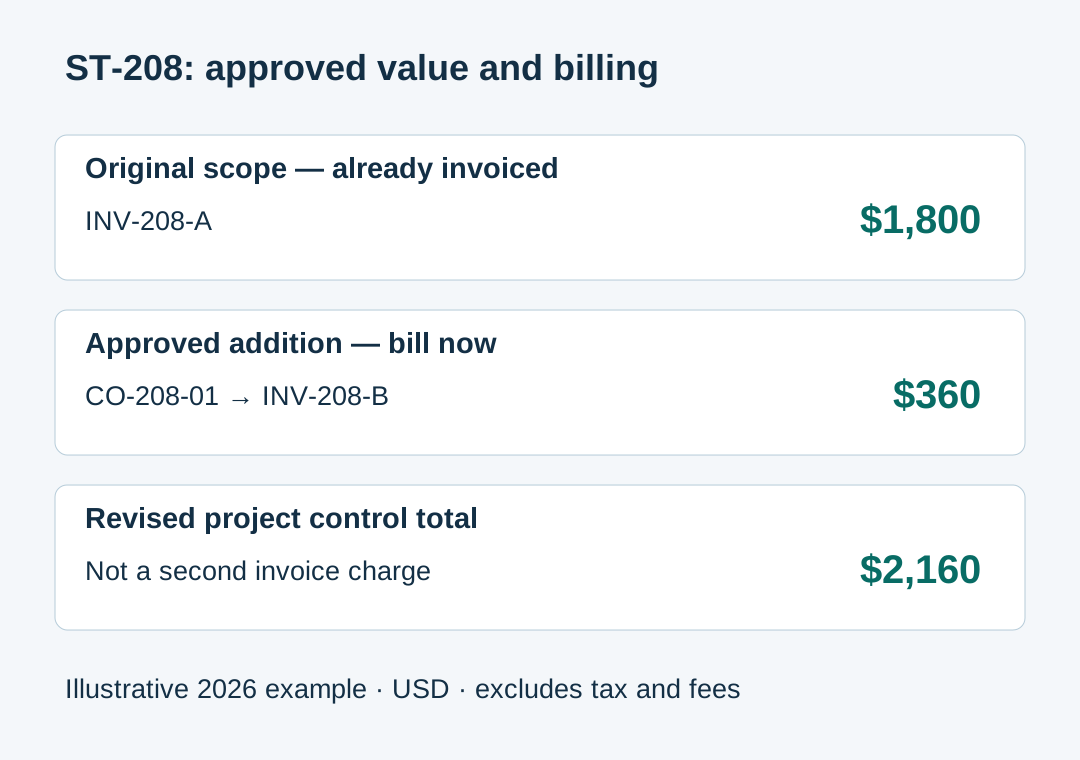
This example assumes the entire original scope was already invoiced, the addition has not been invoiced before, and there are no credits, cancellations, or other changes. If any assumption differs, reconcile your actual invoice register before using the subtraction. A revised budget minus cash received is not a reliable formula for the next invoice.
If only part of the original project has been invoiced, separate its remaining billing milestones from the new work. Do not silently accelerate the original balance because a change was approved. If a deposit has been collected, check how it was documented and applied; the final invoice deposit guide addresses that separate reconciliation.
Write a line item the client can trace
For INV-208-B, a useful description is: “ST-208 — three additional layout variations delivered under approved CO-208-01, 3 × $120, $360.” Use the actual delivery period and the correct customer identity. Include the original project and change references where the customer can find them.
A short note can say: “This invoice bills CO-208-01 only. Original scope was invoiced separately on INV-208-A.” Attach the approval or provide the agreed supporting reference through a channel the customer accepts. Keep unrelated project and customer information out of the attachment.
Use the issue date and due date appropriate to the actual invoice and agreed terms. Do not copy an old due date accidentally or backdate the document to the original project start. If the change has different terms, show them clearly and retain the agreement supporting them.
The invoice should identify the charge for the addition. A separate project summary may show the $2,160 revised value and the $1,800 previously invoiced, but label that summary so it cannot be mistaken for another payment request. Avoid a prominent $2,160 “amount due” on a document whose current charge is $360.
Before sending, compare the PDF with the approved scope, quantity, rate, currency, and references. You can prepare the document using the Eonebill invoice generator. This guide assumes you maintain the approval evidence and project register yourself; it does not assume automatic change-order conversion or accounting synchronization.
Keep prior payment status separate from the new charge
INV-208-A may be paid, partly paid, or overdue. None of those states changes the agreed $360 addition in this example. Track the two invoices individually so a reminder for the original balance does not become another charge on the new invoice.
For example, if the customer has paid $1,000 toward INV-208-A, its remaining balance is $800. After INV-208-B is issued, the combined outstanding balance is $800 + $360 = $1,160. That is a project balance across two invoices, not a reason to replace the new invoice's $360 charge with $1,160.
If you provide a statement, list each invoice, payments applied, and the remaining balance for each. Ask for remittance instructions when one payment covers both. Match the money to the proper references before marking either invoice paid; the invoice-to-bank-payment guide covers that step.
Where a change reduces or replaces earlier scope, stop before treating it as a simple positive addition. Determine which issued documents need correction or credit through your established process. Preserve their history and seek accounting or legal advice where needed. This article does not prescribe a universal correction method.
Close the loop with a small project register
Maintain one row for each approved change: reference, description, approval evidence, amount, billing trigger, invoice reference, and status. For CO-208-01, the row should point to INV-208-B once issued. Marking that link prevents the same approval from being invoiced again during a later monthly billing run.
Review the register against both your sent-invoice folder and the customer's portal before resubmitting anything. If the customer merely lost INV-208-B, send an unchanged copy with the existing reference; do not create another charge. The invoice copy guide explains that distinction.
Keep the agreement, change approval, delivery evidence, invoice, and payment record together. The IRS guidance on supporting business records identifies transaction documents as support for book entries. That general recordkeeping guidance does not determine whether your particular change is enforceable or when income must be recognized. Official source checked November 20, 2026; no tax rates, thresholds, filing dates, or state rules are asserted here.
Before sending the next change invoice, confirm three things: the addition is approved, its billing trigger has occurred, and the same amount is not already on an issued invoice. The result should be a charge the customer can trace from approval through delivery to payment.
Educational information only. Ask a qualified adviser about contractual requirements, invoice corrections, accounting entries, and tax treatment for your circumstances.
Create this in 30 seconds — free invoice with Eonebill, no sign-up required.
Create Free Invoice →Frequently Asked Questions
More Posts

How to Resend an Invoice Copy Without Charging Twice
Resend a lost invoice with its original reference, distinguish copies from corrections, and explain payments already received. Includes a $900 example.

How to Invoice a Partial Delivery Without Billing Twice
Bill split shipments clearly: link each delivery note to its invoice, track quantities already billed, and avoid charging twice. Includes a $480 worked example.

How to Prevent Duplicate Vendor Payments
Use one vendor invoice register to check mailed checks, card payments, and scheduled transfers before paying a supplier bill. See a worked $690 example.
Newsletter
Join the community
Subscribe to our newsletter for the latest news and updates