How to Send a Customer Statement for Multiple Unpaid Invoices
Summarize existing invoices without creating another charge. Separate overdue and not-yet-due balances with a checked $1,650 account example.

A customer has three open invoices and asks, “What do we owe you altogether?” Send a customer account statement that lists the existing invoices, the payments already applied, and the remaining balance as of a stated date. Keep the original invoice numbers. A statement summarizes the account; it should not create another charge for the same work.
This guide covers a practical manual workflow for a U.S. freelancer or small business. It uses a fictional November 2026 example in U.S. dollars. It does not prescribe a legally required statement format, determine tax timing, or promise automatic statement generation in Eonebill.
Start with the existing invoices and payment records
Choose a cutoff date before adding the numbers. A statement dated November 24 should explain whether it includes transactions through the end of November 23 or through a particular time on November 24. Use the same cutoff throughout the document.
Gather each original invoice, its issue date and agreed due date, any linked credit documentation, and the payment records. Check whether a recent bank transfer has actually arrived and which invoice the customer intended it to pay. A screenshot saying a payment was initiated is a reason to investigate, rather than evidence that every open invoice is settled.
For help with that distinction, read bank transfer receipt versus bank confirmation. For a payment covering several invoices, follow the matching workflow in how to match invoices to bank payments.
Keep account identifiers simple and safe: your business name, the customer's billing name, a customer reference if you use one, the statement date, and the cutoff. Send the statement to the established billing contact through your normal channel. Avoid adding bank details from an unverified email request.
Build one line per invoice, then calculate the balance
Suppose a fictional design studio prepares a statement on November 24, 2026, including confirmed transactions through November 23. There is no opening balance from earlier periods, no tax adjustment, and no credit note in this simplified example.
- INV-301: issued October 20; due November 3; original charge $900; confirmed payment applied $300; remaining balance $600.
- INV-315: issued November 5; due November 19; original charge $650; no payment applied; remaining balance $650.
- INV-329: issued November 20; due December 4; original charge $400; no payment applied; remaining balance $400.
The original charges total $1,950. Subtract the $300 payment once to get $1,650 outstanding. Of that amount, $1,250 is past the stated due dates as of the cutoff and $400 is not yet due. Do not describe the entire $1,650 as overdue.
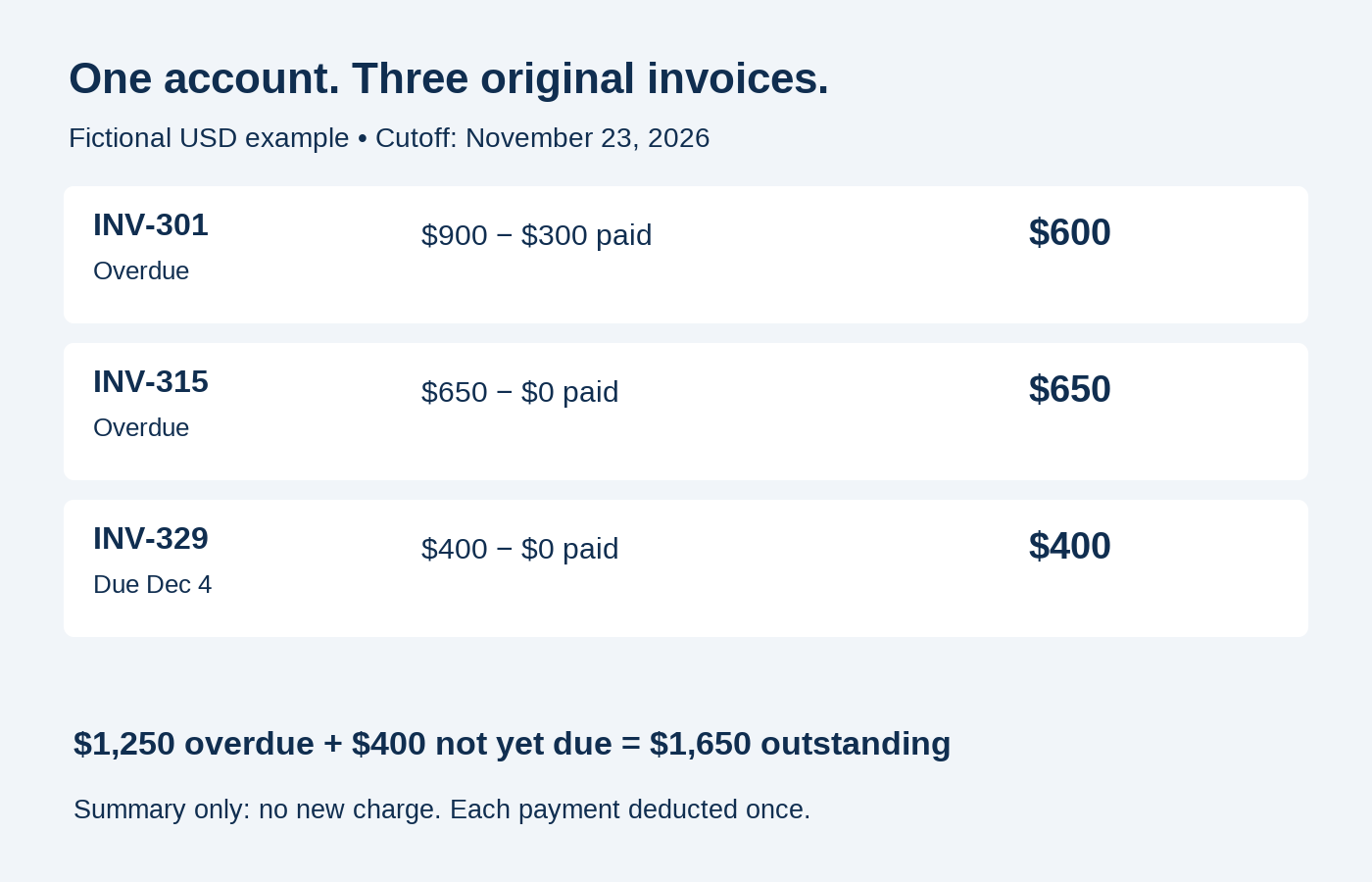
A customer should be able to trace every line back to its original invoice. Include the original charge, payments or credits applied, and the remaining amount; identify payment references separately when space permits. Put the statement total below the rows and label it “Outstanding balance as of November 23, 2026.” Show “Overdue: $1,250” and “Not yet due: $400” separately.
If you include an opening balance instead of listing every older invoice, define which period it covers and provide the supporting invoice schedule. Do not include an older invoice both inside the opening balance and again as a new charge. For a short list, itemizing all open invoices is usually easier for the customer to check.
Resolve unapplied payments and disputed amounts before sending
An incoming payment with no clear invoice reference should stay visible in your reconciliation notes until you confirm its allocation. Ask the customer which invoices it covers and compare that answer with your payment evidence. Do not distribute it arbitrarily just to make the account look tidy.
For example, if a separate $650 transfer arrives after the cutoff, the November 23 snapshot still shows the original balance. A later statement can show that receipt once confirmed and allocated. Tell the customer that the earlier snapshot may not reflect the later payment. If the payment was actually received before the cutoff but was missed, correct the statement and label the replacement with a revision date.
A disputed invoice needs its own note. State which amount is disputed and which amount remains undisputed; a statement alone does not settle the disagreement. Do not add a late fee unless the applicable agreement and rules support it. This example adds no fees or interest.
Credits also need a trail. Identify the invoice they adjust and retain the corresponding correction record. Do not erase a charge, change an invoice number, or turn a payment into a discount merely to make the statement total match an email.
Send a summary email that does not create a new bill
Use a subject such as “Account statement through November 23 — invoice references attached.” The statement itself can carry a clear note: “Summary of existing invoices; no new charge created.” Attach the original invoice copies the customer needs, preserving their numbers and terms.
Here is an illustrative email for the example above:
“Hello Morgan, attached is your account statement through November 23. It summarizes INV-301, INV-315 and INV-329. The outstanding balance is $1,650, including $1,250 past the listed due dates and $400 due December 4. This statement summarizes existing invoices and creates no additional charge. If you have sent a payment not shown here, please reply with its date, amount and invoice references so we can check it. Thank you.”
Do not invent a new due date for the whole account if the invoices have different agreed dates. Avoid a new invoice number on the statement: a separate statement reference is fine when clearly labeled, but it should not enter your sales records as another sale.
If the customer only needs one lost invoice, resend the existing invoice copy. A statement is useful when the question concerns several documents or an account-wide balance.
Keep the statement connected to the supporting records
Save the sent statement, cutoff, recipient, original invoices, confirmed receipts, payment allocations and subsequent corrections together. Retain the file actually sent, rather than relying on a current dashboard that changes as new payments arrive. When a customer replies with a discrepancy, you can compare the same dated snapshot.
For U.S. federal recordkeeping, the IRS identifies invoices and receipts among supporting business documents and explains that records support the entries in business books. A statement helps organize those records; it does not replace the underlying documents or determine when income belongs on a tax return. See IRS: What kind of records should I keep?.
Use the Eonebill invoice generator to prepare an individual invoice with clear line items and payment terms. For a customer statement, assemble and check the account summary against your actual invoice and payment records. This guide does not claim that the generator automatically imports payments, ages balances, or produces customer statements.
Before sending, check that every invoice appears once, every payment is deducted once, the cutoff is visible, overdue and not-yet-due amounts are separate, and the total agrees with your supporting records. After payment, update the relevant invoice balances and keep the statement as the historical snapshot it was intended to be.
Educational information only, not individualized tax or legal advice. The federal supporting-records source was checked November 24, 2026. The 2026 dates and dollar amounts are fictional workflow examples; no tax rates, filing deadlines, deduction thresholds or state-specific rules are asserted.
Create this in 30 seconds — free invoice with Eonebill, no sign-up required.
Create Free Invoice →Frequently Asked Questions
More Posts

How to Prepare a Year-End Bookkeeping Handoff Packet
Organize invoices, payment evidence, receipts, and unresolved questions into a dated packet your bookkeeper can review without guessing.

How to Resubmit an Invoice Rejected for a Missing PO Number
Resolve a missing purchase order reference, preserve the invoice history, and resubmit one traceable charge with a practical $1,250 example.

How to Invoice an Approved Change Order Without Billing Twice
Turn an approved scope addition into a traceable invoice. Reconcile prior billing with a $1,800 project and $360 change-order example.
Newsletter
Join the community
Subscribe to our newsletter for the latest news and updates