How to Resend an Invoice Copy Without Charging Twice
Resend a lost invoice with its original reference, distinguish copies from corrections, and explain payments already received. Includes a $900 example.

A client emails: “We lost your invoice. Can you send another one?” The safest starting point is the invoice you already issued. Resending a copy should help the customer find the existing charge, without creating another receivable, changing the payment terms, or asking them to pay twice.
This guide describes a practical document-control workflow for US freelancers and small businesses. The fictional 2026 example uses US dollars and excludes tax and fees. It does not set legal invoice requirements, tax treatment, or an accounting policy for your business.
Confirm whether the client needs a copy or a correction
Ask what is missing. A lost PDF, a new accounts-payable contact, and an incorrect customer name are different requests. If the original details are correct, retrieve the original file and resend it. If the customer wants the amount, buyer identity, or scope changed, stop and review that correction separately with your bookkeeper.
A useful reply is: “I can resend a copy of INV-719. Please confirm the recipient email and whether you need the original document unchanged or are requesting a correction.” Verify a new recipient through an established contact, especially when the request also changes bank details. Do not send customer documents to an unverified address merely because the message mentions a genuine invoice number.
Look up the invoice in your own records rather than using a screenshot alone. Confirm the customer, invoice reference, original issue date, description, currency, total, due date, and any payments or credits already recorded. Check for an existing dispute before sending a routine payment reminder with the copy.
Preserve the original reference and document history
For an unchanged copy, retain the existing invoice number, issue date, line items, currency, total, and agreed terms. The resend date belongs in the email or your delivery log; it should not silently replace the original invoice date. Save the resend record alongside the original so you can explain why two files or emails exist.
Label the email “Copy of INV-719 — no new charge.” You can also use a clearly named attachment such as INV-719-copy.pdf. If adding a copy label to the document, preserve the original file and avoid obscuring invoice details. A copy label describes document history; it does not prove that the invoice is paid.
Do not assign a fresh invoice number just because the client changed their email address. A new number can look like a second sale to the customer's accounts-payable team. If their system rejects an identical upload, ask how it accepts a replacement attachment for the existing invoice, rather than inventing a second charge to bypass the warning.
Show the current balance without rewriting the sale
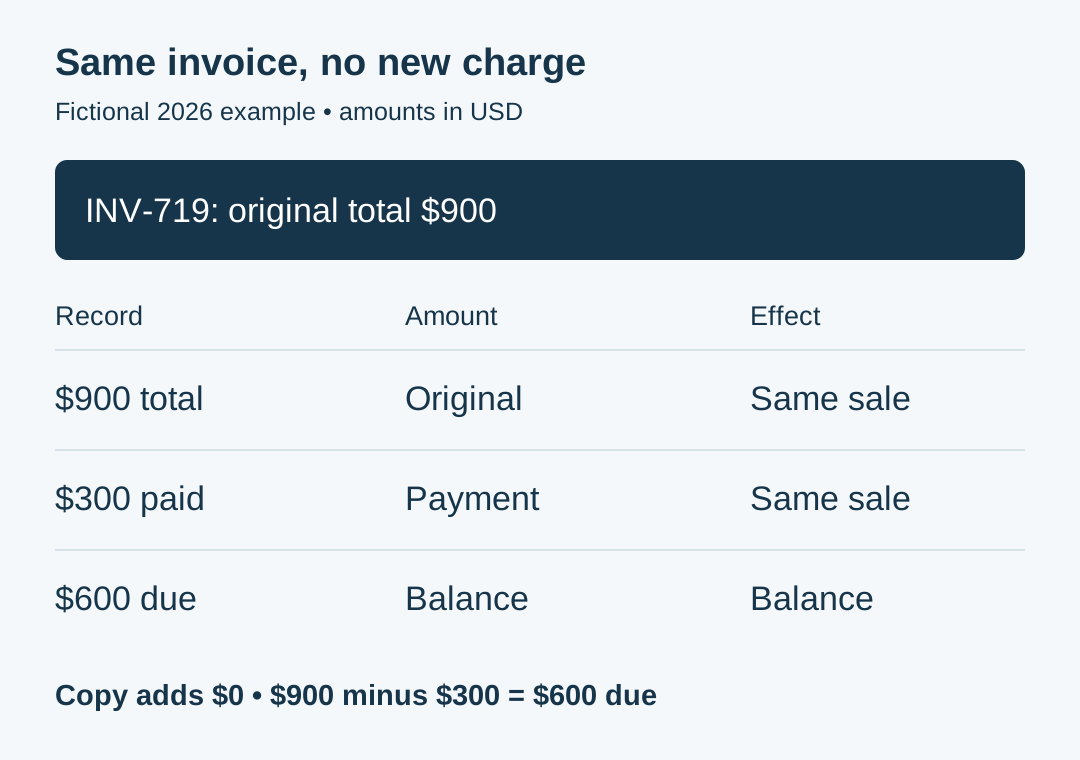
Suppose INV-719 was issued for $900. The client has already paid $300, leaving $600 outstanding. They now request another copy because their bookkeeper cannot locate the PDF.
- Original invoice total: $900.
- Payment received and applied: $300.
- Remaining balance: $900 − $300 = $600.
- Additional charge created by resending: $0.
The copy still identifies the same $900 invoice. Your accompanying balance summary explains the $300 received and $600 still due. Do not replace the original $900 total with $600 without context: that can make the earlier payment look unrelated or turn the file into an unexplained revision.
If the invoice is fully paid, state that clearly in the accompanying message and attach the relevant receipt if appropriate. Do not include an unqualified “please pay” request for a settled invoice. If your records show an excess payment, resolve that separately using the invoice overpayment guide.
Before quoting a balance, match the payment against the correct invoice. A deposit from the same customer may cover another job. Use your transaction records and any remittance instructions; the invoice-to-bank-payment guide explains that matching process.
Keep corrections separate from unchanged copies
A client may say “send another invoice” when they really mean “change the legal customer,” “add our purchase order,” or “remove an item.” Record the requested change and its reason before editing. Confirm whether it is a formatting request, a factual correction, or a change to the underlying transaction.
A copy and a corrected invoice serve different purposes. For a substantive correction, use the correction process appropriate to your accounting records, agreement, and jurisdiction. That may involve a revised document, cancellation, or credit documentation; this article does not prescribe one method for every business. Preserve the original and a clear link to any approved replacement.
Do not backdate a new sale or change the customer identity solely to satisfy an expense claim. Do not assume that adding a purchase-order reference changes the payment due date. Confirm any agreed changes in writing and keep them visible in your records.
If someone asks to change the bank account on the copy, verify the instruction independently through a known channel. A resend request is a document request, not sufficient authority to alter payment instructions. Keep bank details consistent with your approved records until the change is verified.
Send the copy with a short, useful message
For the example above, write: “Attached is a copy of the original INV-719 for $900, issued November 5, 2026. This is the same invoice and creates no additional charge. Our records show $300 received and $600 remaining under the original terms. Please let us know if your payment records differ.”
Include the original reference in the subject, use the verified recipient, and attach the correct file. Avoid sending several unlabeled versions. Where useful, include the original due date and the payment reference supporting the balance, without exposing unrelated bank transactions.
You can prepare invoice documents with the Eonebill invoice generator. For an unchanged resend, prefer the original saved PDF. If you must recreate a document, compare every field with the issued original before sharing it and clearly identify it as a copy. This guide does not assume automatic version control, accounting posting, or payment-status synchronization in the tool.
Log the date, recipient, file sent, original invoice reference, and reason for resending. Keep any delivery failure or acknowledgement with that entry. A resend log records communication; it does not establish that the customer accepted a disputed charge or that money arrived.
The IRS guidance on supporting business records explains that transaction documents support entries in your books. Keep the original, any approved revisions, payment evidence, and resend correspondence together. Source checked November 19, 2026. No tax rates, filing deadlines, thresholds, or state-specific rules are asserted here.
Before closing the request, check that the customer has the right document, your records still contain one underlying charge, and any reminder reflects the current balance. A careful resend solves a missing-document problem without introducing a billing problem.
Educational information only. Consult a qualified adviser about legal invoice requirements, corrections, accounting entries, and tax treatment for your circumstances.
Create this in 30 seconds — free invoice with Eonebill, no sign-up required.
Create Free Invoice →Frequently Asked Questions
More Posts

How to Invoice a Partial Delivery Without Billing Twice
Bill split shipments clearly: link each delivery note to its invoice, track quantities already billed, and avoid charging twice. Includes a $480 worked example.

How to Prevent Duplicate Vendor Payments
Use one vendor invoice register to check mailed checks, card payments, and scheduled transfers before paying a supplier bill. See a worked $690 example.

How to Show a Deposit on a Final Invoice
Show the original project total, a deposit already paid, and the exact balance due on a final invoice. Follow a worked example and check the payment request.
Newsletter
Join the community
Subscribe to our newsletter for the latest news and updates