How to Invoice a Partial Delivery Without Billing Twice
Bill split shipments clearly: link each delivery note to its invoice, track quantities already billed, and avoid charging twice. Includes a $480 worked example.

A customer orders 40 notebooks, but only 25 leave your warehouse today. Should the invoice show the whole order or just the shipment? Start with the billing arrangement you agreed with the customer. When the arrangement is to bill as goods ship, connect each invoice to the quantities actually delivered and keep a running record of what has already been billed.
This guide uses a fictional US small-business order in 2026. It explains document control, not when revenue must be recognized or how sales tax applies. Confirm your contract and applicable tax treatment with your adviser before changing either.
Separate the order, shipment, and invoice
The purchase order records what the buyer requested. The delivery note records the contents of a particular shipment. The invoice requests payment under the agreed terms. These documents can share an order reference while recording different quantities.
For a split order, give each shipment its own delivery reference. Put that reference and the original order number on the corresponding invoice. Do not reuse an invoice number for a later shipment, and do not describe an unshipped balance as delivered.
If your agreement calls for advance billing or milestone billing, the invoice may legitimately differ from quantities shipped. Label that arrangement clearly. A shipping record alone does not change the customer's payment obligations. See purchase order vs. invoice for the basic document roles.
Work through one split order
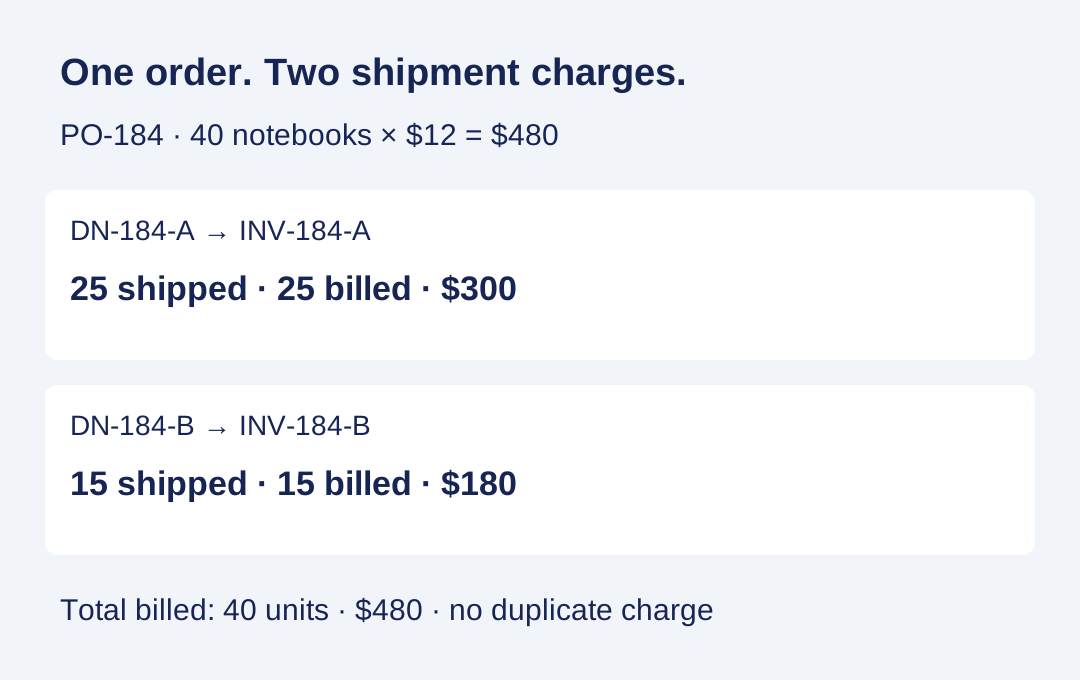
Imagine order PO-184 for 40 notebooks at $12 each. The merchandise total is $480. For clarity, this example excludes tax, shipping, discounts, and deposits; those items require their own agreed treatment.
On November 18, shipment DN-184-A contains 25 notebooks. Under the agreed ship-and-bill terms, invoice INV-184-A charges 25 × $12 = $300. Its description reads: “25 notebooks delivered under DN-184-A, against PO-184; 15 units remain unshipped and unbilled.”
On the second shipment, DN-184-B contains the remaining 15 notebooks. Invoice INV-184-B charges 15 × $12 = $180. It refers to PO-184 and DN-184-B and notes that 25 units were billed on INV-184-A. The total invoiced is $300 + $180 = $480.
The second invoice is $180. Showing the full $480 order value again as the amount due would bill the first shipment twice. An order summary can show $480 for context, provided the current charge is unmistakably $180.
Keep a quantity register before sending another bill
Use one row per order line. Record the ordered quantity, each delivery reference, shipped quantity, each invoice reference, and billed quantity. Keep payment status separate: a billed shipment can still be unpaid.
For PO-184 after the first shipment, the register should show 40 ordered, 25 shipped, 25 billed, and 15 remaining to ship and bill. After the second shipment it should show 40 shipped and 40 billed in total. Compare quantities as well as dollars; a price change or credit can make an amount-only comparison misleading.
Before releasing the next invoice, check the new shipment against prior invoices and any returns or credits. If the delivery note includes items shipped earlier, clarify whether it is a cumulative summary or a new shipment. Do not turn a cumulative quantity into a fresh invoice charge.
Save the customer's order, delivery evidence, invoice copies, correspondence, and payment records together. The IRS business-records guidance explains why supporting transaction documents matter. For US federal recordkeeping, supporting records substantiate entries in the books; an invoice by itself does not establish that payment occurred. Guidance checked November 18, 2026. This article makes no tax-rate, filing-deadline, or deduction-threshold claim.
Handle exceptions without hiding the history
The first invoice is unpaid. Send a reminder for INV-184-A separately. The second invoice can identify that earlier unpaid balance in a clearly labelled account summary, but its new shipment charge remains $180. Keep the two invoice references visible so the customer can allocate payment correctly.
You already billed the entire order. Check the agreement and existing invoice before creating another charge. A later delivery note can reference the original invoice without creating another bill. If the original invoice was wrong, follow your accounting system's correction or credit process and retain the audit trail; do not silently replace the original.
The buyer cancels the remainder. Update the unshipped quantity and retain the cancellation approval. Check whether any amount already invoiced or paid needs a credit or refund. The result depends on the agreed terms and facts; a cancelled shipment does not automatically erase an existing receivable.
There is a deposit. Track it separately from quantities. Show how the deposit is applied and avoid subtracting it on both invoices. Our deposit on a final invoice guide walks through that balance presentation.
Prepare the shipment document and send a clear email
Use the Eonebill delivery note generator to prepare a document for the current shipment. Review its quantities and references before sharing it. Keep your shipment and billing register separately; this workflow does not assume automatic inventory tracking or invoice reconciliation in the tool.
A short invoice email can say: “Attached is INV-184-A for the 25 notebooks in delivery DN-184-A under PO-184. The shipment charge is $300. The remaining 15 notebooks have not been billed and will be invoiced when shipped under our agreement. Please use INV-184-A as your payment reference.”
Before sending, match the customer name, order number, delivery number, unit price, current quantities, amount due, and agreed payment terms across the documents. Check that the attachment is the current invoice rather than an old full-order draft. For payments covering more than one invoice, use a separate allocation record; see matching invoices to bank payments.
Educational information only. Contract obligations, sales tax, and accounting treatment depend on your business and jurisdiction. Consult a qualified professional for those decisions.
Create this in 30 seconds — free invoice with Eonebill, no sign-up required.
Create Free Invoice →Frequently Asked Questions
More Posts

How to Resend an Invoice Copy Without Charging Twice
Resend a lost invoice with its original reference, distinguish copies from corrections, and explain payments already received. Includes a $900 example.

How to Prevent Duplicate Vendor Payments
Use one vendor invoice register to check mailed checks, card payments, and scheduled transfers before paying a supplier bill. See a worked $690 example.

How to Show a Deposit on a Final Invoice
Show the original project total, a deposit already paid, and the exact balance due on a final invoice. Follow a worked example and check the payment request.
Newsletter
Join the community
Subscribe to our newsletter for the latest news and updates