How to Show a Deposit on a Final Invoice
Show the original project total, a deposit already paid, and the exact balance due on a final invoice. Follow a worked example and check the payment request.

On the final invoice, show the full project total, the deposit already received, and the remaining balance. Give the deposit its own labeled line below the total, with a payment date and a reference the client can match to their records. The amount due on the PDF and the payment request should agree.
If your customer wired a deposit weeks ago, they may still see the full project amount when the final invoice lands in their inbox. A clear balance calculation lets them check what you charged and what they already paid before they approve a second transfer.
Match the deposit to the project first
Start with the accepted quote or order, the deposit request, and evidence that the payment arrived. Match the customer, project, amount, and payment reference. A deposit request tells you what you asked for. A bank or processor record tells you what arrived. Record both references if your customer uses one number for their purchase order and your business uses another for the invoice.
If a client's bank transfer has a vague memo and they have two open jobs, ask which order it covers before applying it. Keep the confirmation with the payment record so the next person who handles the invoice can trace the allocation. If the payment is still pending, show it as pending in your notes and wait for confirmation before calling it received.
Show the project total and the remaining balance
Here is a fictional example for a custom packaging job. The original quote Q-204 was $2,400, the client approved a $150 proof revision on CO-01, and an $800 bank transfer cleared against deposit request DEP-204. The example leaves out taxes to isolate the payment calculation.
| Final invoice INV-204 | Amount |
|---|---|
| Packaging design and production, Q-204 | $2,400.00 |
| Approved proof revision, CO-01 | $150.00 |
| Project total | $2,550.00 |
| Less deposit received Nov 4, 2026, DEP-204 | −$800.00 |
| Balance due Nov 30, 2026 | $1,750.00 |
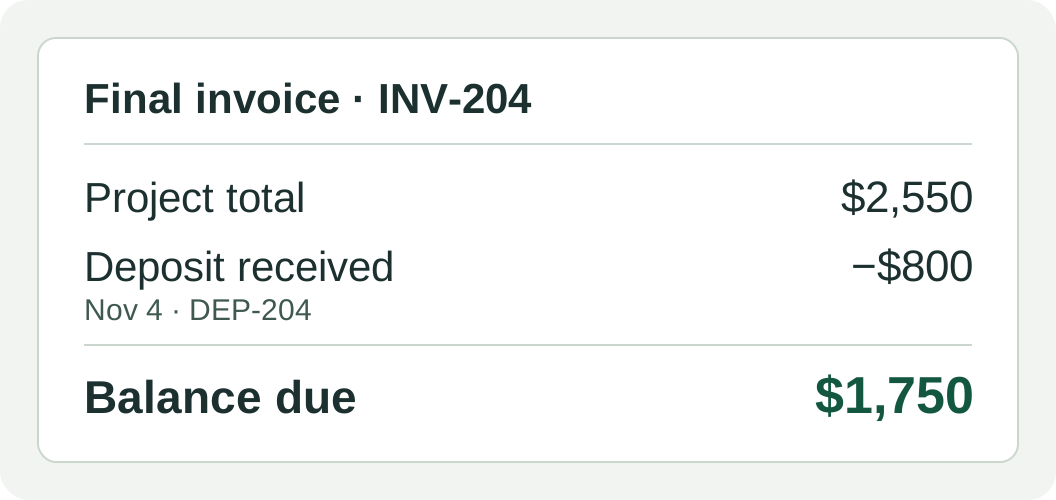
The customer can trace the revision to their approval, see that the deposit was applied, and pay exactly $1,750. If your actual invoice includes tax, use the correct project total from your billing system before reconciling the payment. A discount changes the agreed charge. An applied deposit explains how much of that charge the customer has already paid.
Use the layout your billing system can reconcile
If your system supports applying a customer payment to an invoice, record the deposit through that workflow and check the customer-facing total, payments, and balance. If it bills the deposit and final installment as separate invoices, show which stage this invoice bills and reference the earlier paid document. You can include a project summary for context. The final invoice should only request the amount that remains to be billed under that setup.
Avoid leaving a deposit request and a full-price final invoice both open for collection after the deposit has been paid. Also avoid subtracting $800 in the invoice lines and then applying the same $800 payment again. In the example, that would produce an incorrect balance of $950. Check the customer's statement or open-invoice view as well as the PDF.
If you send an online payment request, compare its checkout amount with the printed balance before sending. When you correct a payment application after sending, explain which invoice or payment request the customer should use and keep a record of the correction.
Send a note the customer can reconcile
Use the invoice and deposit references in the email or portal message. For example:
“Attached is INV-204 for packaging order Q-204. The project total is $2,550, including the approved $150 proof revision. We applied the $800 payment received on November 4 against DEP-204. The remaining $1,750 is due November 30.”
Keep the accepted quote, change approval, invoice, and evidence of the deposit together. The IRS guide to supporting business records explains how invoices and deposit information can support entries in your books. The date you apply a deposit on an invoice and the date you received it are different events. Keep both dates. This billing example illustrates customer balances and recordkeeping, with federal recordkeeping guidance checked November 16, 2026. Tax treatment depends on your facts and accounting method.
Prepare your final invoice
Start from an Eonebill invoice template to itemize the project and add its reference numbers. Before sending, confirm how your billing system applies the previously received amount, and preview the document and payment request together. If you are still waiting for the first payment, see how to create a deposit invoice for that earlier step.
Create this in 30 seconds — free invoice with Eonebill, no sign-up required.
Create Free Invoice →Frequently Asked Questions
More Posts

How to Resend an Invoice Copy Without Charging Twice
Resend a lost invoice with its original reference, distinguish copies from corrections, and explain payments already received. Includes a $900 example.

How to Invoice a Partial Delivery Without Billing Twice
Bill split shipments clearly: link each delivery note to its invoice, track quantities already billed, and avoid charging twice. Includes a $480 worked example.

How to Prevent Duplicate Vendor Payments
Use one vendor invoice register to check mailed checks, card payments, and scheduled transfers before paying a supplier bill. See a worked $690 example.
Newsletter
Join the community
Subscribe to our newsletter for the latest news and updates