How to Reconcile a Stripe Refund in a Later Payout
Trace a Stripe refund into a later payout, match the bank deposit, and link it to the original invoice with a worked two-month example.

A Stripe refund can show up in your November payout even when the original client payment reached your bank in October. Start with the refund in November's payout report. Then trace it back to the original Stripe payment and invoice. The payout amount explains what reached your bank, while the linked records explain what happened to each sale.
For a U.S. freelancer or small service business, that distinction matters when you close the month. A smaller deposit can reflect a refund on an older job even though clients paid their current invoices in full.
Identify the refund and its original payment
Open the refund in Stripe and confirm its amount, currency, status, and original payment. Save the refund reference and the original payment reference as separate fields. If you can identify the underlying invoice, record its number and why the refund was issued. For a partial refund, also check whether any earlier refunds were issued against the same payment.
For an automatic payout, open Stripe's Payout reconciliation report. Use a date range that covers the payout's expected arrival and download the itemized rows for that payout. Find the refund in those rows. Compare the amount, currency, and references to the refund detail. Save the payout ID alongside the refund, even if it differs from the payout that carried the original payment.
A refund request, a completed refund, and a refund included in a payout are different milestones. If you cannot find the refund in the expected batch, check its status and the next report before trying to clear the difference. Stripe's refund documentation explains how refunds can remain pending or fail.
Work through a refund in the next month
Suppose a designer invoices a client $600 and receives the full $600 through Stripe in October. The October payout contains only that payment and an $18 fee in this example, so the bank receives $582. In November the designer agrees to refund $150 for a canceled part of the job.
A November payout includes two unrelated, fully paid invoices for $400 and $300, $21 in combined fees, and the $150 refund for the October job. It reaches the bank as $529. All figures are illustrative USD amounts, with no exchange-rate or tax adjustments.
- October payout: $600 payment minus $18 in fees equals $582 at the bank.
- November payout: $400 plus $300 in payments, minus $21 in fees and the $150 refund, equals $529 at the bank.
- Original October job: $600 paid and $150 refunded leaves $450 of the customer's original payment retained. The original $18 fee remains a separate processor record in this example.
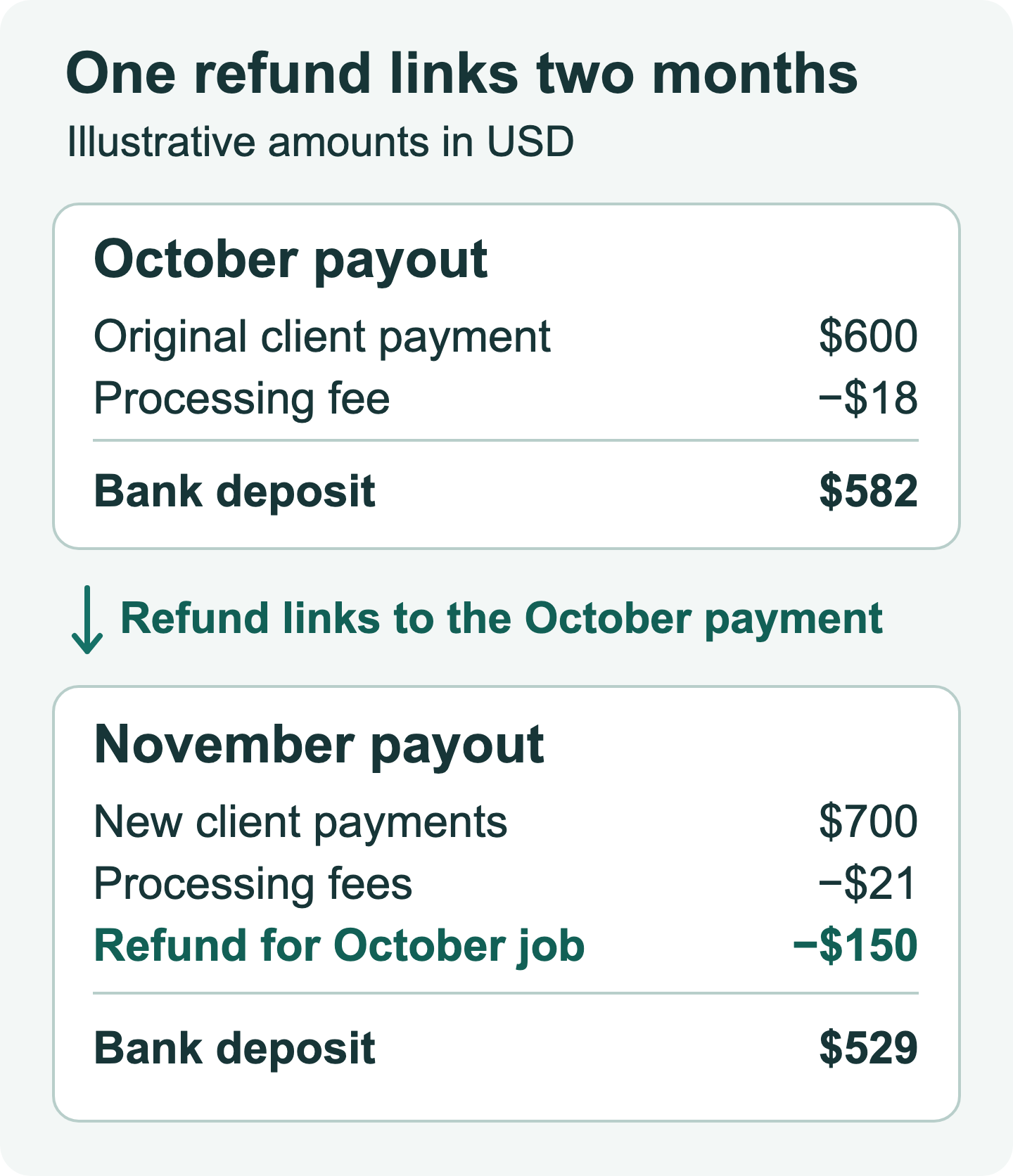
Both new invoices were paid in full. Applying the $150 refund or the $21 fees against either new invoice would create a false unpaid balance. Keep the November refund connected to the October invoice and retain the original invoice, payment and payout references for that job. If you issue a credit note under your billing process, link it to the same records. The refund invoice template shows the document details you may need.
Reconcile the deposit from the itemized rows
Start with the payout ID and the account that sent the funds. Work in one settlement currency. Sum the signed net amounts in the itemized report for that payout and compare the result with the bank deposit. If you use the net column, the fee included in a row's net amount has already been accounted for. Check separately listed adjustment rows before making any manual correction.
The refund's date alone cannot tell you which payout it affected. Compare its itemized row and payout ID with your bank record, then trace its source payment in Stripe. Matching a refund based only on an identical dollar amount is risky when you offer standardized prices or issue several refunds in one week.
If the sum and bank deposit differ, check the account, currency, payout status and date filter first. A nearby payout for the same amount can be a different transfer. If you use manual payouts, Stripe points to its Balance report for a balance-based workflow. Stripe also says that it cannot assign individual transactions to instant payouts the way it does for automatic payout batches. Use the account's transaction history and the bank transfer record for that reconciliation.
Leave an audit trail across both months
In the month you confirm the refund, add a short note that a reviewer can follow without reopening every bank statement. A useful example is “$150 partial refund for October invoice INV-1041, linked to original Stripe payment and November payout; November client invoices paid in full.”
Keep these records together or cross-reference them in your ledger:
- Original invoice number and customer payment reference.
- Refund reference, amount, currency, reason, and supporting client correspondence.
- Payout ID, bank deposit reference, and itemized report used to match them.
- Any credit note, bookkeeper adjustment, or unresolved question about timing.
If your Stripe integration imports the refund and your bank feed imports the payout, check whether both entries already exist before creating a manual refund. The two feeds can describe different parts of the same movement of money. Give each record its own reference and connect them rather than recording the refund again when the bank deposit clears.
Keep the original invoice intact as evidence of what you billed. For everyday U.S. recordkeeping, the IRS recordkeeping overview explains the role of business records. If a refund crosses a tax year or affects a filed return, ask your tax adviser how to treat it for your accounting method and circumstances. This example covers payout reconciliation and makes no tax-year-specific filing claim. Official references were checked on November 9, 2026.
Make the next refund easier to trace
Give each invoice a stable reference and keep it with the processor payment record. If you need an invoice for a new job, use the Eonebill invoice generator to create the source document. Keep Stripe's payout CSV with the bank reconciliation and link exceptions back to the billing record. For the basics of direct bank payments, see the EFT payment guide.
Ready to manage invoices, contracts & proposals in one place? Try Eonebill free — no credit card required.
Start Free →Frequently Asked Questions
More Posts

Check Received in December, Deposited in January: Which Tax Year?
Find the tax year for a December customer check deposited in January, then match the bank entry without counting the income twice.

Form 1099-NEC Amount Wrong? How to Reconcile It
Trace a Form 1099-NEC Box 1 mismatch to specific invoices and payments, then send the payer a documented correction request.

Paid a Business Expense With a Personal Card? Record It Once
Connect supplier receipts, personal-card payments, and later transfers with worked examples that keep one business purchase from becoming two expenses.
Newsletter
Join the community
Subscribe to our newsletter for the latest news and updates